
We recently took on a very tough project involving Sage 50 Desktop software. The client was not able to upgrade to a newer version of Sage that would have provided easy cloud access and a modern API for integration. This presented a unique problem where we needed to automate the creation of invoices based on customer usage of their product. Gathering the billing information for invoices from their Salesforce tenant was a snap in Power Automate, but we had to take a much different route when dealing with Sage 50.
How to integrate with Sage 50 Desktop?
We started by searching the internet for any existing third-party API that works with their (older) version of Sage. Nothing. Next, we tested some automation features using Power Automate Desktop. This method proved very cumbersome and unreliable.
Finally, we discovered the .net SDK from the Sage team. This allowed us to quickly build a .net Web Service to interact with Sage via this SDK. We deployed the web services to a virtual machine in their Azure environment that was also running the Sage software. We developed API endpoints for searching, creating, and modifying invoices, as well as some endpoints for querying customer information that need to be included in each invoice.
Connecting it to the Cloud
Next, with our custom Sage Web Services deployed locally, we now needed to access them from Power Automate. Bring in the Azure On-premises Data Gateway from Microsoft. This application runs on the local machine and exposes the web service endpoints to the cloud securely.
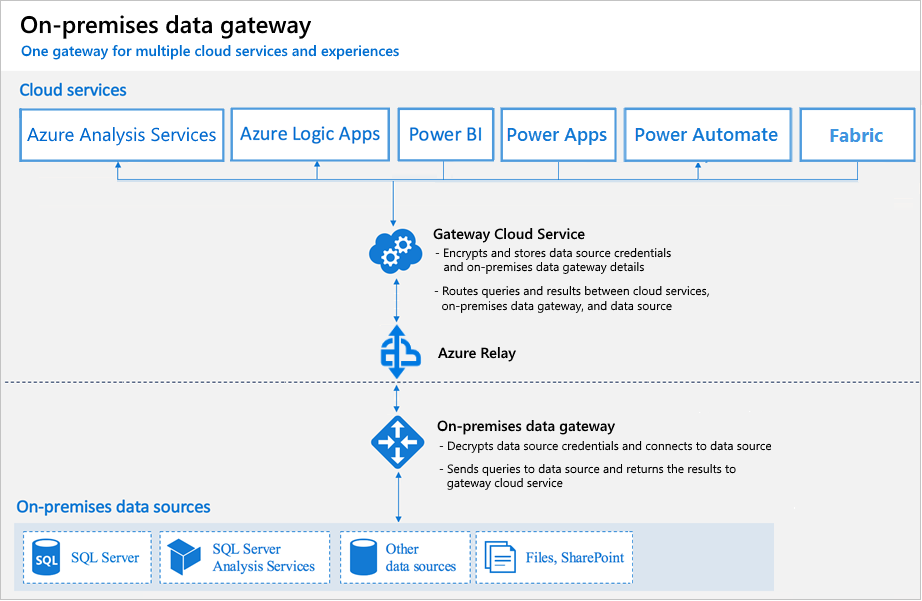
With our custom Sage API now securely accessible from Power Automate, we could tie in the endpoint calls and call it day.
If you ever happen to run into an old version of Sage and want to automate some of the processes give us a shout and I hope this article helps you along.